
BackTrack+ Compass1.2.0 - Google Play
You'll be able to see results in few seconds.
Publisher Description
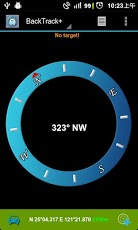
Free version (with ADs), please check:https://play.google.com/store/apps/details?id=com.patrickintw.BackTrackBackTrack+ Compass, is the easiest to use personal location finder and compass. Just mark your location (up to three locations), and BackTrack will show the direction and distance, to help you get back. It also support to entry location manually.BackTrack+ Compass also support to calculate the average of locations, can be use to hide the cache (geocache).Use it for shopping, parking, travel, and geocaching.Features:* store and location up your locations.* manual location entry.* show and setup location with Google map* screen always on.* electronic compass* different patterns for distance* calculate the average of selected locations* save location to my favoritesThere are ads in history and map view
About BackTrack+ Compass
The company that develops BackTrack+ Compass is PatrickInTW. The latest version released by its developer is 1.2.0.
To install BackTrack+ Compass on your Android device, just click the green Continue To App button above to start the installation process. The app is listed on our website since 2013-02-26 and was downloaded 0 times. We have already checked if the download link is safe, however for your own protection we recommend that you scan the downloaded app with your antivirus. Your antivirus may detect the BackTrack+ Compass as malware as malware if the download link to com.patrickintw.BackTrackPro is broken.
How to install BackTrack+ Compass on your Android device:
- Click on the Continue To App button on our website. This will redirect you to Google Play.
- Once the BackTrack+ Compass is shown in the Google Play listing of your Android device, you can start its download and installation. Tap on the Install button located below the search bar and to the right of the app icon.
- A pop-up window with the permissions required by BackTrack+ Compass will be shown. Click on Accept to continue the process.
- BackTrack+ Compass will be downloaded onto your device, displaying a progress. Once the download completes, the installation will start and you'll get a notification after the installation is finished.
Program Details
System requirements
Download information
Pricing
Version History
version 1.2.0
posted on 2013-02-26
Several fixes and updates
version 1.2.0
posted on 2013-02-26
Disclaimer
Official Google Play Link
We do not host BackTrack+ Compass on our servers. We did not scan it for viruses, adware, spyware or other type of malware. This app is hosted by Google and passed their terms and conditions to be listed there. We recommend caution when installing it.
The Google Play link for BackTrack+ Compass is provided to you by apps112.com without any warranties, representations or guarantees of any kind, so access it at your own risk.
If you have questions regarding this particular app contact the publisher directly. For questions about the functionalities of apps112.com contact us.
